WSLg with Docker
This comes from my work on my drone simulator in o3de, After dockerizing it I wanted to see if I could get it to run on windows
WSLg Archiecture
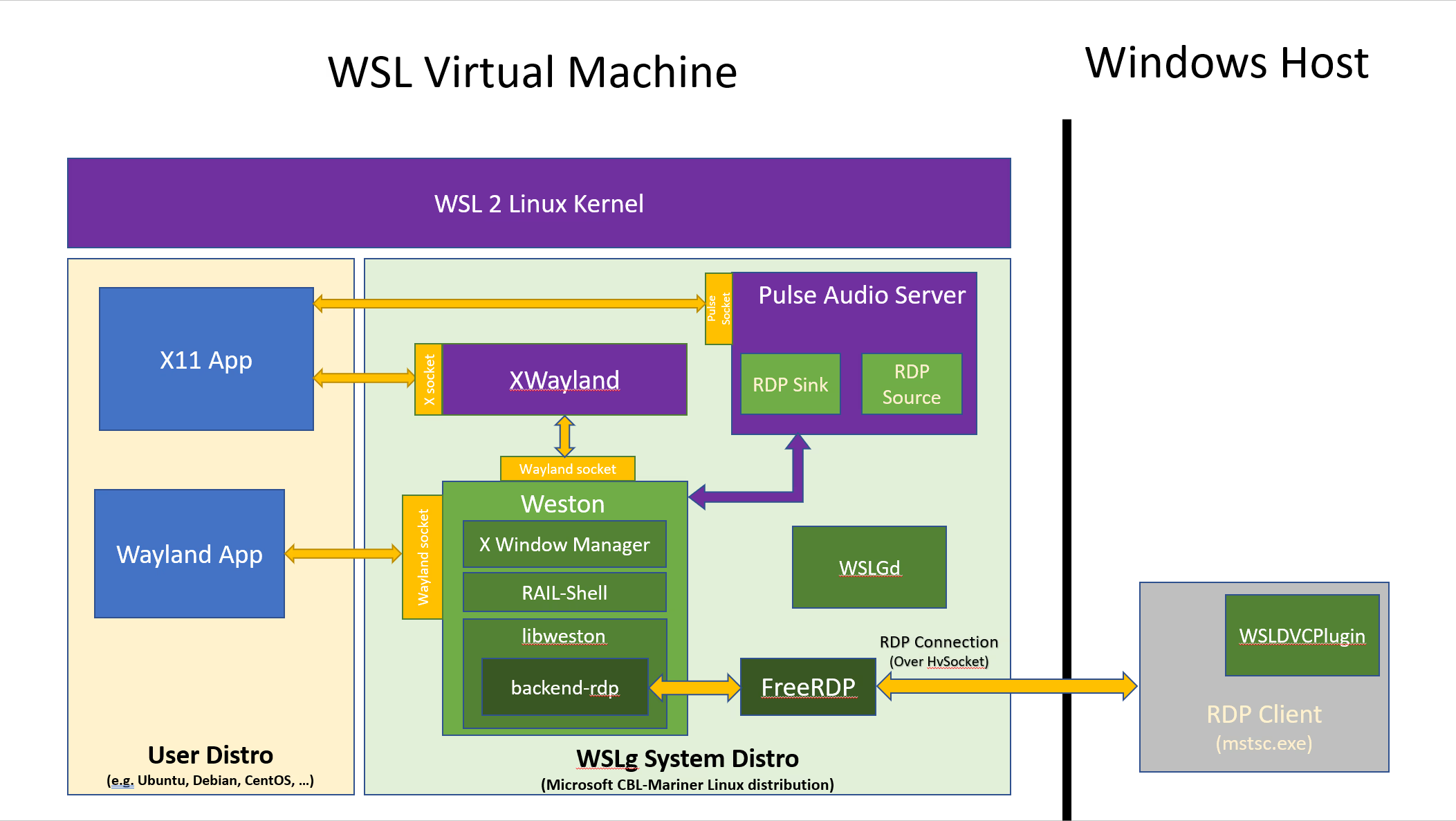
So in any WSL distro, the environment variables are all properly set and /mnt/wslg is mounted so the applications work without any configuration but this isn't the case inside our docker container
Now this setup is purely concerned with displaying windows onto the screen in windows when we need GPU acceleration we have to use a vGPU bridge between WSL & DX12
So to do the hookups yourself it looks like this:
 docker run -it \
    -v /tmp/.X11-unix:/tmp/.X11-unix \
    -v /mnt/wslg:/mnt/wslg \
    -v /usr/lib/wsl:/usr/lib/wsl --device=/dev/dxg \
    -e DISPLAY=$DISPLAY \
    -e WAYLAND_DISPLAY=$WAYLAND_DISPLAY -e XDG_RUNTIME_DIR=$XDG_RUNTIME_DIR \
    -e PULSE_SERVER=$PULSE_SERVER \
    --gpus all videoaccel
This command should be run from another WSL distro with Docker <-> WSL integration enabled (so you can use the docker command)This command is also only if you have a GPU you want to passthrough, if not then you can use this simplified version:
docker run -it \
    -v /tmp/.X11-unix:/tmp/.X11-unix \
    -v /mnt/wslg:/mnt/wslg \
    -e DISPLAY=$DISPLAY \
    -e WAYLAND_DISPLAY=$WAYLAND_DISPLAY \
    -e XDG_RUNTIME_DIR=$XDG_RUNTIME_DIR \
    -e PULSE_SERVER=$PULSE_SERVER xclock
for docker compose
  o3de-wsl-gpu:
    <<: *o3de-base
    devices:
      - /dev/dxg
    environment:
      - DISPLAY=${DISPLAY}
      - WAYLAND_DISPLAY=${WAYLAND_DISPLAY}
      - XDG_RUNTIME_DIR=${XDG_RUNTIME_DIR}
      - PULSE_SERVER=${PULSE_SERVER}
      - QT_X11_NO_MITSHM=1
      - ROS_DOMAIN_ID=${ROS_DOMAIN_ID:-1}
      - QT_QPA_PLATFORM=xcb
      - NVIDIA_DRIVER_CAPABILITIES=all
      - LIBVA_DRIVER_NAME=d3d12
      - LD_LIBRARY_PATH=/usr/lib/wsl/lib
    volumes:
      - /tmp/.X11-unix:/tmp/.X11-unix:rw
      - /mnt/wslg:/mnt/wslg:rw
      - /usr/lib/wsl:/usr/lib/wsl:rw
      - .:/workspace
    deploy:
      resources:
        reservations:
          devices:
            - driver: nvidia
              count: all
              capabilities: [gpu]
vGPU & DirectX
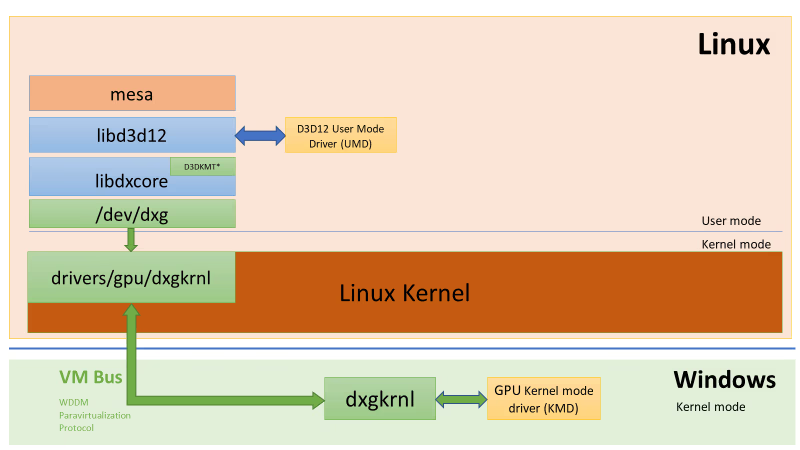
dxgkrnl is a custom linux kernel driver that communicates over the VM bus to the windows GPU driver and uses this connection to talk to the physical GPU
But nothing on linux speaks DirectX for obvious reasons and right now only DirectX is passed through, so any applications on linux using OpenGL, OpenCL or Vulkan use a MESA translation layer to DirectX before communicating with the GPU.
⚠ Docker Desktop includes the Nvidia Container Runtime by default on windows so you needn't install it seperatley.
MESA & Vulkan
Unfortunatley this MESA component is only in up-to-date versions of mesa so for Ubuntu generally you need to update the mesa version:
sudo add-apt-repository ppa:kisak/kisak-mesa
sudo apt update
sudo apt upgrade
on Arch you need to install
mesa & vulkan-dzn⚠
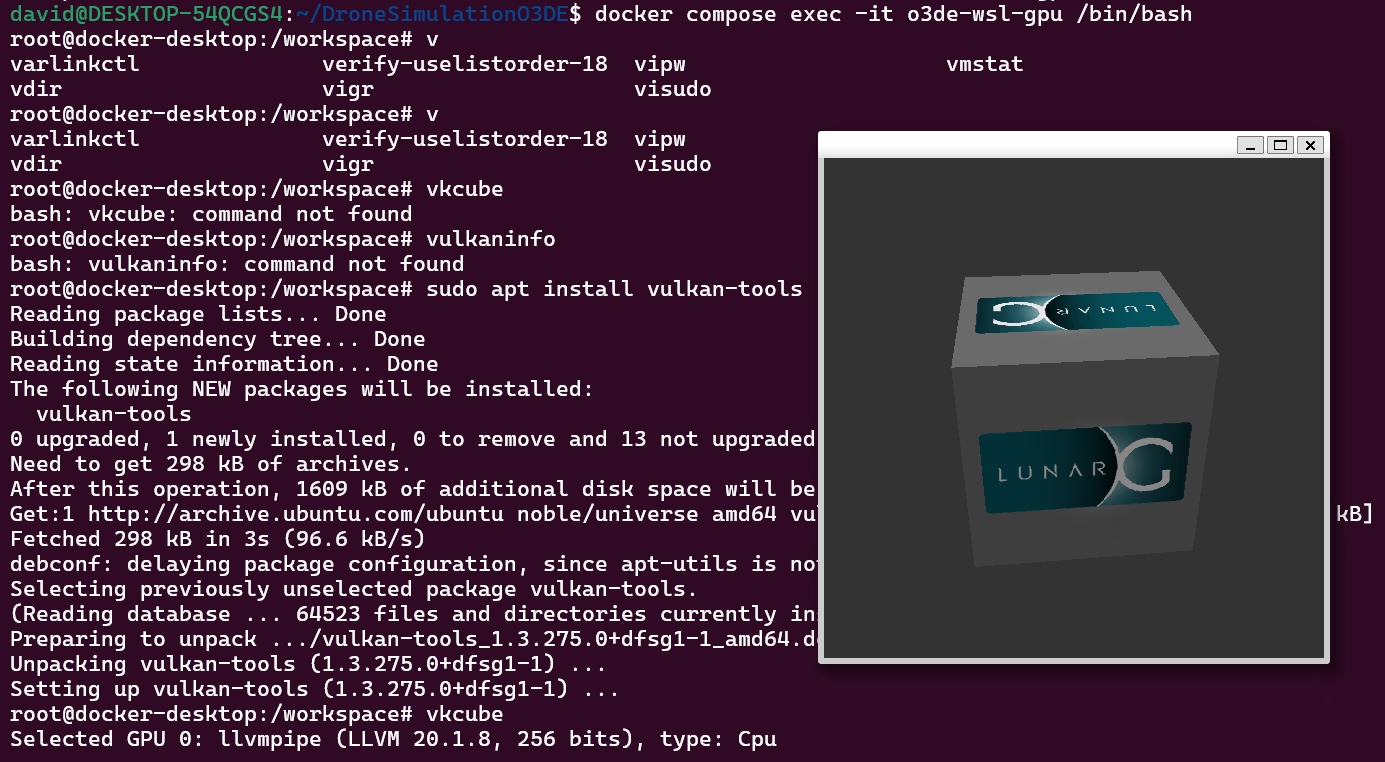
dzn unfortunatley isnt fully compliant yet and it is a WIP so some applications (like O3DE 😢) may not work / crash. So you might have to use llvmpipe which is basically software rendering but through vulkan.Selecting specific devices
You can't currently do this due to limitations in the Nvidia Docker implementation, only --gpus all is supported, so you can only give the docker container access to all the gpus.
Sources