Terminal tips & tricks
xterm
neovim
One day while tweaking my colourscheme, I noticed that my neovim wasn't displaying any italics
like I had specified in it. After double checking that everything was fine from my configuration side, I resolved it to be something between neovim and the terminal.
An hour of googling and trying a bunch of different fixes ensue, But most nothing happens till I try running neovim through the env program, forcibly overriding the XTERM_VERSION variable to be empty, This finally gave the correct behaviour.
sixel
Seems like some kind of bug?, Maybe its because my xterm is run in vt340 mode to allow sixel support (Yes, xterm has sixel!!!)
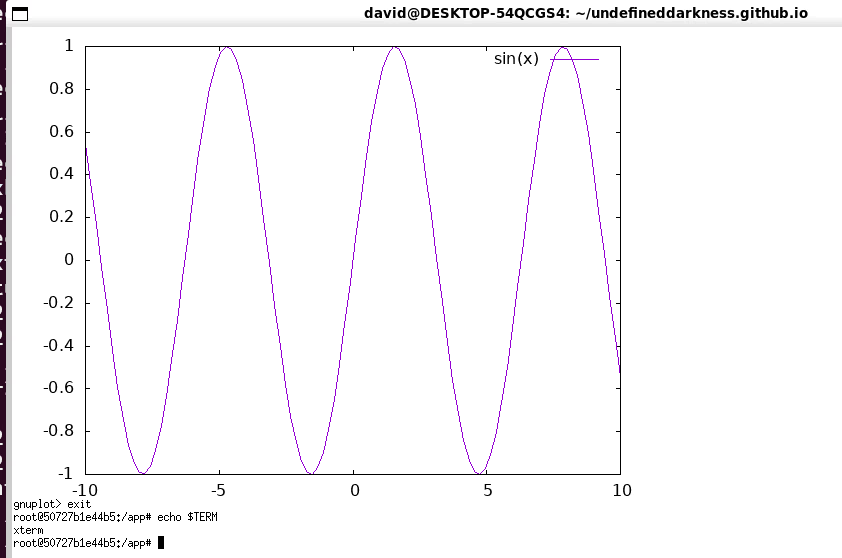
To enable it launch it with -ti vt340 or if you are using Xrdb to configure it
xterm*decTerminalID: vt340
You can watch a video using sixel or kitty by doing: curl https://mjpeg-demo.vercel.app/sixel/256 (or 1024 if your terminal supports it) / curl https://mjpeg-demo.vercel.app/kitty
comparison of the different terminal graphics protocols with mjpeg & h264, h265
Size
180 177.11
▐ ████████████▌ ▐ zstd_mb 🮅🮅🮅🮅
▐ ████████████▌ ▐
▐ ████████████▌ ▐
▐ 160.9 ████████████▌ ▐
160 ▐ ▐████████████ ████████████▌ ▐
▐ ▐████████████ ████████████▌ ▐
▐ ▐████████████ ████████████▌ ▐
▐ ▐████████████ ████████████▌ ▐
▐ ▐████████████ ████████████▌ ▐
140 ▐ ▐████████████ ████████████▌ ▐
▐ ▐████████████ ████████████▌ ▐
▐ ▐████████████ ████████████▌ ▐
▐ ▐████████████ ████████████▌ ▐
▐ ▐████████████ ████████████▌ ▐
120 ▐ ▐████████████ ████████████▌ ▐
▐ ▐████████████ ████████████▌ ▐
▐ ▐████████████ ████████████▌ ▐
▐ ▐████████████ ████████████▌ ▐
▐ ▐████████████ ████████████▌ ▐
100 ▐ ▐████████████ ████████████▌ ▐
▐ 90.97 ▐████████████ ████████████▌ ▐
MB ▐ ▆▆▆▆▆▆▆▆▆▆▆▆▆ ▐████████████ ████████████▌ ▐
▐ █████████████ ▐████████████ ████████████▌ ▐
▐ █████████████ ▐████████████ ████████████▌ ▐
80 ▐ █████████████ ▐████████████ ████████████▌ ▐
▐ █████████████ ▐████████████ ████████████▌ ▐
▐ █████████████ ▐████████████ ████████████▌ ▐
▐ █████████████ ▐████████████ ████████████▌ ▐
▐ 56.22 █████████████ ▐████████████ ████████████▌ ▐
60 ▐ ▂▂▂▂▂▂▂▂▂▂▂▂ █████████████ ▐████████████ ████████████▌ ▐
▐ ████████████▌ █████████████ ▐████████████ ████████████▌ ▐
▐ ████████████▌ █████████████ ▐████████████ ████████████▌ ▐
▐ ████████████▌ █████████████ ▐████████████ ████████████▌ ▐
40 ▐ ████████████▌ █████████████ ▐████████████ ████████████▌ ▐
▐ ████████████▌ █████████████ ▐████████████ ████████████▌ ▐
▐ ████████████▌ █████████████ ▐████████████ ████████████▌ ▐
▐ ████████████▌ █████████████ ▐████████████ ████████████▌ ▐
▐ ████████████▌ █████████████ ▐████████████ ████████████▌ ▐
20 ▐ ████████████▌ █████████████ ▐████████████ ████████████▌ ▐
▐ ████████████▌ █████████████ ▐████████████ ████████████▌ ▐
▐ ████████████▌ █████████████ ▐████████████ ████████████▌ ▐
▐ ████████████▌ 7.22 4.23 █████████████ ▐████████████ ████████████▌ ▐
▐ ████████████▌ ▐████████████ ▂▂▂▂▂▂▂▂▂▂▂▂ █████████████ ▐████████████ ████████████▌ ▐
0 ▐▂▂▂▂▂🮅🮅🮅🮅🮅🮅🮅🮅🮅🮅🮅🮅▂▂🮅🮅🮅🮅🮅🮅🮅🮅🮅🮅🮅🮅▂▂🮅🮅🮅🮅🮅🮅🮅🮅🮅🮅🮅🮅▂▂🮅🮅🮅🮅🮅🮅🮅🮅🮅🮅🮅🮅🮅▂▂🮅🮅🮅🮅🮅🮅🮅🮅🮅🮅🮅🮅▂▂▂🮅🮅🮅🮅🮅🮅🮅🮅🮅🮅🮅🮅▂▂▂▂
jpeg h264 h265 sixel-256 sixel-1024 kitty
Protocol Notes
* all sizes above are zstd-compressed; h264, jpeg, h265 dont compress much since they are already compressed formats, sixel compresses well and kitty is just pngs with some markers so it compresses a little also
* capture settings weren't uniform: jpeg/h264/h265 were captured at 320px/30fps over 7089 frames, while sixel-256/sixel-1024/kitty were captured at 240px/15fps over 3545 frames (a quarter as much raw pixel data per second) — so the sizes above aren't apples-to-apples across those two groups, only within each
OSC 52
One of my biggest peeves with tmux was that copy-paste was very unintuitive and especially to get it into the system clipboard was a pain even on the same machine, Let alone a machine that I am ssh'd into. This was the one thing that made me create like 8 different panes instead of using tmux but recently I found a feature that fully solves this but it requires both the terminal and tmux to be configured to use it.
The OSC 52 escape codes allow a terminal to copy into your clipboard and optionally read from it as well (this is usually disabled for security), The benefit of it being an escape code is that any application that is sending text to the terminal (through ssh, tmux or whatever) can copy into the clipboard so you can use it to copy text from tmux within an ssh session.
To enable it, you must have a supported terminal emulator and enable it in the terminal emulator and in tmux with set -g set-clipboard on
For xterm, it is: XTerm*disallowedWindowOps: 20,21,SetXprop
Neovim by default will only use it in SSH sessions, to make it always use it so that it doesnt depend on any desktop tools like xclip or wlclip etc, you can use vim.g.clipboard = "osc52" in modern versions of neovim.
NOTE: VTE (Gnome based, terminator etc) do not support it as of yet.
If you want to test if your terminal supports it, you can run this command:
printf '\033]52;c;%s\007' "$(printf '%s' 'Hello from OSC 52' | base64 | tr -d '\n')"
It should copy "Hello from OSC52" into your clipboard